
Approved at 2pm. Installed by 2:05.
Staff request the software they need and the groups they need to be in. The right people approve, in the order you set. The last approval adds them to the Intune group that grants it — no ticket afterwards, no administrator in the middle, and the whole trail on the record.
The problem
The technical work takes a minute. Everything around it takes days.
An organization standardizes on Microsoft Intune. Applications are packaged, groups are built, assignments work. Then the daily reality sets in.
- 01
Every request is a ticket
Someone needs an app. They email IT, or open a ticket, or ask in a channel. An IT person reads it, decides whether it is legitimate, chases the manager for a yes, and finally adds the person to a group.
- 02
Nobody can see where a request is
The requester does not know if it was seen. The manager does not know they are the blocker. IT gets asked for status, which is another ticket.
- 03
Group access is asked for informally, or not at all
“Can someone add me to the finance group” arrives in a chat message, gets actioned by whoever sees it first, and leaves no record of who agreed to it. It is the same decision as granting software, made with less care.
- 04
Approval lives in inboxes
The decision that actually matters — should this person have this software — gets made in a forwarded email, and leaves no record anyone can point to later.
- 05
Handing out group management does not work either
Giving managers direct rights in Intune or Entra to fix this trades a queue for a governance problem.
- 06
People leave, requests don’t
Someone leaves the company, and their half-approved requests sit in approvers’ queues with no one to grant them to.
The product
What Catalog does
Publish
IT publishes, once
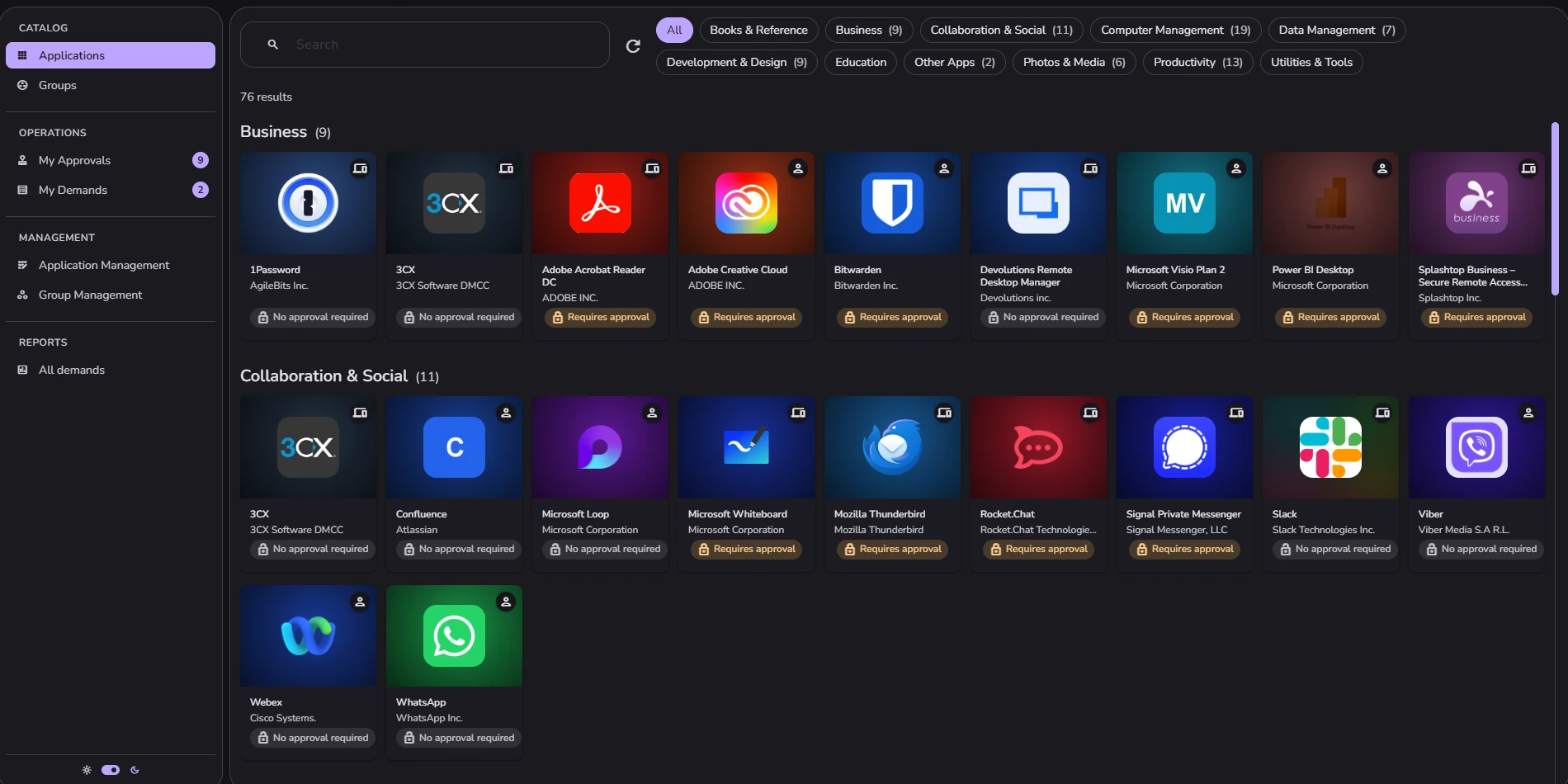
An application manager searches the organization’s existing Intune applications, picks one, and publishes it: a name and description staff will understand, a moderator, the install group that grants it, whether it is for Windows or macOS, whether it is assigned to a person or a device, who is allowed to see it, and the approval steps a request has to clear. Directory groups are published the same way.
Nothing to repackage — you publish what already exists in Intune No agent on any device, no second directory to keep in step Whoever curates the catalog does not need to be a Global Administrator
Request
Staff serve themselves
People sign in with their Microsoft work account and see a catalog: searchable, filtered by category, showing for each item whether it needs approval and how many steps that takes. They request it. If it is an application that installs on a device, they choose which of their own managed devices it goes to, and only devices running the right operating system are offered.
Requesters follow their own requests through every step Duplicate requests are prevented, so two approvers never act on the same thing Every screen and every notification is in English or French, chosen per person
Approve
You design the chain, per item
Add as many steps as the decision deserves, with no limit, and make each one whatever fits: the requester’s manager, their manager’s manager, a third level up, the moderator of the item, or a specific person or group you name. Mix them in any order.
Steps run in sequence, and each approver gets an email that links straight to the decision Approving or rejecting can carry a comment, which stays on the request’s record An item with no steps is granted the moment it is asked for Approvers get one queue of what is waiting on them An approver who is away can name up to three colleagues to cover for them
Grant
Intune does the delivery
On the final approval, the person — or the device they chose — is added to the Intune group behind that item. From there it is a normal Intune assignment: the same deployment mechanism you already trust, triggered by a decision your own people made.
If the hand-off to Intune fails it is retried If it still fails, the request is marked failed and the requester is told plainly Nothing appears to have worked when it did not
Lifecycle
Departures clean themselves up
Catalog reconciles against your directory: people who have left are removed, disabled accounts give their place back, and any request they had open is closed with the approvers told why.
If the directory read comes back incomplete, nothing is removed at all If a run would remove an implausible share of your people, it stops and reports The organization’s root user is never removed automatically
What makes it different
Ranked, and each one checkable in the product.
Approval and delivery are the same event
The final approval adds the requester — or the specific device they chose — to the group that grants the software, and Intune takes it from there. Nobody is in the loop after the decision, because there is nothing left to do.
A service-desk tool routes the request and records the yes. Someone still has to go into Entra or Intune and grant the access. That step is where the delay lives. The approval chain is yours to shape — and then it maintains itself
Every application and every group carries its own chain, built from as many steps as the decision actually needs. One step for most things, four for the one that touches customer data, none at all for the harmless ones.
Manager steps are resolved from your Microsoft directory as each step comes up, then recorded on that step. They are not kept here as a list. Every tool that asks you to configure approver lists begins decaying the day you finish configuring it. This one has no lists to configure. Everyone gets their own catalog
Visibility is set per item, to named people or to directory groups, nested groups included. Publish a design tool to the design department and nobody else knows it exists.
That is the difference between a catalog and a price list: people stop asking for things they were never going to get, and you stop advertising your whole estate to your whole company. It asks for very little, and explains itself first
Six Microsoft permissions. Five are read-only. The one that writes adds people to groups — the single thing the product exists to do. The setup screen lists every permission with a plain sentence saying why, before you are sent to Microsoft.
Catalog cannot deploy or alter software, change your device policies, create or delete accounts, or read anyone’s mail or files. Software and group membership are the same request
Asking to join an Intune group runs through the same catalog, the same shape of approval chain and the same automatic fulfilment as asking for an application. The “can you add me to…” message becomes a request with a moderator and a record.
There are no feature tiers
Every plan carries the entire product. The only thing that changes between plans is how many people can use Catalog. This is structural rather than a promise — the product has no mechanism for gating a feature behind a plan, so there is nothing to walk back later.
Capabilities
Everything it does, and what each one means for you.
Everything in this table is in every plan. Plans differ only by how many people can use Catalog.
- Published application catalog
- Staff browse a curated set of your Intune applications, with names, descriptions, publisher, version, icons and categories they recognize.
- Published group catalog
- The same for directory groups, so people can ask to join rather than emailing whoever looks after the group.
- Search, categories and platform
- People find what they need without knowing its official name, and see what applies to the machine they use.
- Windows and macOS
- Device-targeted application requests cover both, and the requester is only offered devices running the right operating system.
- Item visibility scopes
- An application or group can be visible only to named people or named groups, so each person’s catalog shows what they are eligible for and nothing else.
- Device-targeted requests
- For apps that install to a device, the requester picks which of their own managed devices it goes to.
- Device-targeted groups
- A published group can be assigned per person or per device, so a device joins the group instead of the person it belongs to. Groups are not tied to a platform, so all of the person’s devices are offered.
How it works
From nothing to working.
01 · Sign-up
Create your organization
Sign in, confirm your organization’s details and accept the agreements, then choose a plan. Most of the details are already filled in.
02 · Consent
Connect your tenant
A Global Administrator grants Catalog consent to read your Intune applications, devices and directory, and to manage the group memberships that grant access. The consent screen lists exactly those permissions. Then you add a payment method on Stripe’s hosted checkout. Sign-up is four steps in all and takes about a minute, with nobody to call and nothing to install.
03 · Publish
Publish your catalog
Your team searches what already exists in Intune, picks the applications and groups staff should be able to ask for, and sets for each one: a moderator, who can see it, and the approval steps a request must clear.
04 · Request
People ask
Staff sign in with their Microsoft work account, find what they need, and request it — for themselves, or for one of their managed devices.
05 · Decide
The right people decide
Each step notifies its approver, who approves or rejects, with a comment if they want to leave one. The request moves to the next step until it clears or is stopped.
06 · Grant
Access is granted
The requester is added to the group that carries the access, and Intune deploys as it normally would. Everyone involved is told the outcome, and the whole trail stays on the record.
In practice
What it looks like on an ordinary Tuesday.
New starter
A new starter’s first week
Maria joins the design team. Instead of a list of things to email IT about, she opens Catalog and requests the four applications her team uses. Two have no approval step and are granted immediately. Two go to her manager, who approves them the same afternoon from a link in an email. By the next morning Intune has installed everything on her laptop.
Licence owner
A licensed product with a real gatekeeper
The organization has a limited number of licences for a design application, and the design lead owns them. The application is published so only members of the design and marketing groups can see it, and every request goes to the requester’s manager and then to the design lead. When someone outside those teams needs it, the request never gets made by accident.
Engineering
A device that needs the software, not the person
An engineer needs a CAD package on the workstation in the lab, not on their laptop. They request it, pick the lab machine from their own managed devices, and the approval carries that device with it. The install lands where it was meant to.
IT
A joiner request that outlives the joiner
Someone requests access to two applications and leaves the company a week later, while the requests are still with their manager. The directory clean-up removes them from Catalog, closes both requests, and tells the approvers the requests are closed and need no action.
Finance
A group that four people have to agree on
Joining the group that grants access to the finance reporting system is not a casual request. It is published so only finance and the leadership team can see it, and its chain has four steps: the requester’s manager, their manager’s manager, the group’s moderator in finance, then a named person from security. The same catalog also holds a group anyone may join with no approval at all. Neither is a special case.
IT
A reorganization nobody has to tell Catalog about
Two departments merge and forty people get a new manager. Nothing in Catalog is touched. Every step not yet reached goes to the new manager, because the requester’s manager is read from the directory as each step comes up, not stored as a list somewhere.
IT director
Being asked to grant tenant-wide consent
An IT director is asked to approve a new vendor’s access to their Microsoft tenant — usually the point at which an evaluation slows down for a week. The setup screen lists all six permissions with a sentence each explaining why they are needed, and five of them are read-only. The director can see that the product cannot deploy software, change device policy, create accounts, or read mail before granting anything.
Alternatives
What organizations do instead today.
Drawn from public vendor documentation. If one of these already covers you, it is worth knowing exactly where it stops.
| The alternative | What it gives you | Where it stops |
|---|---|---|
| Intune Company Portal on its own | Self-service install of what IT has already assigned. | No request and no approval — eligibility is decided in advance, by hand. |
| Microsoft Entra ID Governance | A genuine request-and-approve product, plus access that expires and recurring reviews, which Catalog does not have. | Sold per user per month as an add-on requiring Entra P1 or P2 underneath, and aimed at organizations able to run a governance programme. |
| A service-desk tool | Routing, approval, and one queue for everything. | The grant at the end is still a person doing it, unless someone builds the integration. |
| Building it in-house | Fits the organization exactly. | Somebody owns it forever, and it breaks when they leave. |
Stated plainly
What Catalog does not do.
You will find this out in a demo anyway. Here it is now, so nobody spends three weeks evaluating the wrong product.
Time-limited or expiring access Recurring access reviews or recertification Revoking access already granted An organization-wide audit log: you get each request’s history and the request report Licence-cost tracking or reclaim Device-targeted requests for anything other than Windows and macOS devices managed by Intune Support for non-Microsoft device management Approval step types beyond the five described Self-service export or deletion of your people’s personal data Any support commitment: no hours, response times or uptime figure are published Any mobile app
Roadmap · not shipped yet
Where Catalog is heading.
Deliberately light on detail. None of this is available today, and none of it is counted anywhere else on this page.
Access that does not have to be forever
Catalog grants access today and says plainly that it does not take it back. What comes after the grant is the part being worked on.
Top questions
What people ask first
Does this replace Intune?
No. It sits on top of it. Intune stays your deployment and device-management system; Catalog is how people ask for what it delivers and how those requests get approved.
Isn’t Company Portal already self-service?
Company Portal lets people install what has already been assigned to them. Deciding who is eligible still happens beforehand, by hand. Catalog is the part in front of that.
How is this different from Entra ID Governance?
Entra ID Governance is Microsoft’s own answer and a real product — it does things Catalog does not, notably access that expires and recurring access reviews. The differences that matter to most organizations are shape and reach: it is sold per user per month on top of an Entra P1 or P2 licence, and it is built for organizations running a formal governance programme. Catalog does one job — request, approve, grant — for a whole organization at one price, and can be running a minute after you buy it.
What access does it need to our Microsoft tenant?
Six permissions, granted once by a Global Administrator and listed on the Microsoft consent screen: read devices, read Intune apps, read Intune managed devices, read all users’ profiles, sign in and read the user’s own profile, and read/write group memberships — the last being what actually grants approved access.
Is there a free trial?
30 days, on every plan and on both billing terms. It is the whole product, so there is no smaller version to try. A payment method is taken at sign-up on Stripe’s hosted checkout, and nothing is charged until the 30 days are up. Cancel before then and you are not billed, including on a twelve-month commitment: that term starts when billing starts, not when you sign up.
Available now
Set it up in about a minute.
Your organization already has an Intune catalog and an Entra directory. What it does not have is a way for someone to ask for the software they need, or for access to the group they need to be in, without opening a ticket — or for a manager to approve that without an IT person in the middle.