
A new way to run Intune. Finer roles. Every machine, seen.
One console for your Intune users and devices. Your team wipes a laptop or resets a password with a role you define, limited to the users and devices you choose. A Windows agent adds what Intune does not show.
The problem
Delegating Intune work is harder than it should be
Your devices are in Intune and your people are in Entra. Then someone has to do the daily work, and someone has to decide who may do it.
- 01
Routine work needs privileged people
Resetting a password, wiping a lost laptop or retrieving a BitLocker key are routine. In Intune or Entra, they need rights that reach far beyond the task.
- 02
Roles follow function, not territory
Microsoft’s built-in roles describe what someone does, not where. “This person handles the Lyon laptops and nothing else” takes roles, scope tags and groups to express.
- 03
No single place for a user or a device
A user’s licences, devices and admin roles sit in different places in Microsoft.
- 04
“Compliant” does not describe the machine
Intune tells you a device passed its policies. It does not show who holds local administrator rights on it, or what was installed outside your deployments.
The product
What Core does
Roles
Roles that match your organization
Build roles from individual permissions, then attach a scope: this person may act on devices, but only these devices, or only those of these users or groups.
The scope applies when a list loads and again when an action runs In Intune, the same delegation takes a role, scope tags and scope groups
Actions
Actions, not just views
From a device: wipe, Fresh Start, Autopilot reset, BitLocker recovery key, local administrator password rotation. From a user: password reset. Autopilot registrations can be imported in bulk, reviewed and removed.
Each action is its own permission People only see the buttons they are allowed to use
The console
One page per user, one page per device
A user page shows their devices and Microsoft licences together. A device page shows the Intune record and, where the agent runs, its report. One search covers users, groups and devices.
Three reports on live Microsoft data: anomalies, Entra admin roles, Microsoft 365 licence assignment Devices that stop reporting are retired automatically
The agent
What Intune does not hold
A Windows service, published through Intune as a Win32 app. Before it receives credentials, Core checks the device belongs to your Intune estate. It then reports on a regular cycle.
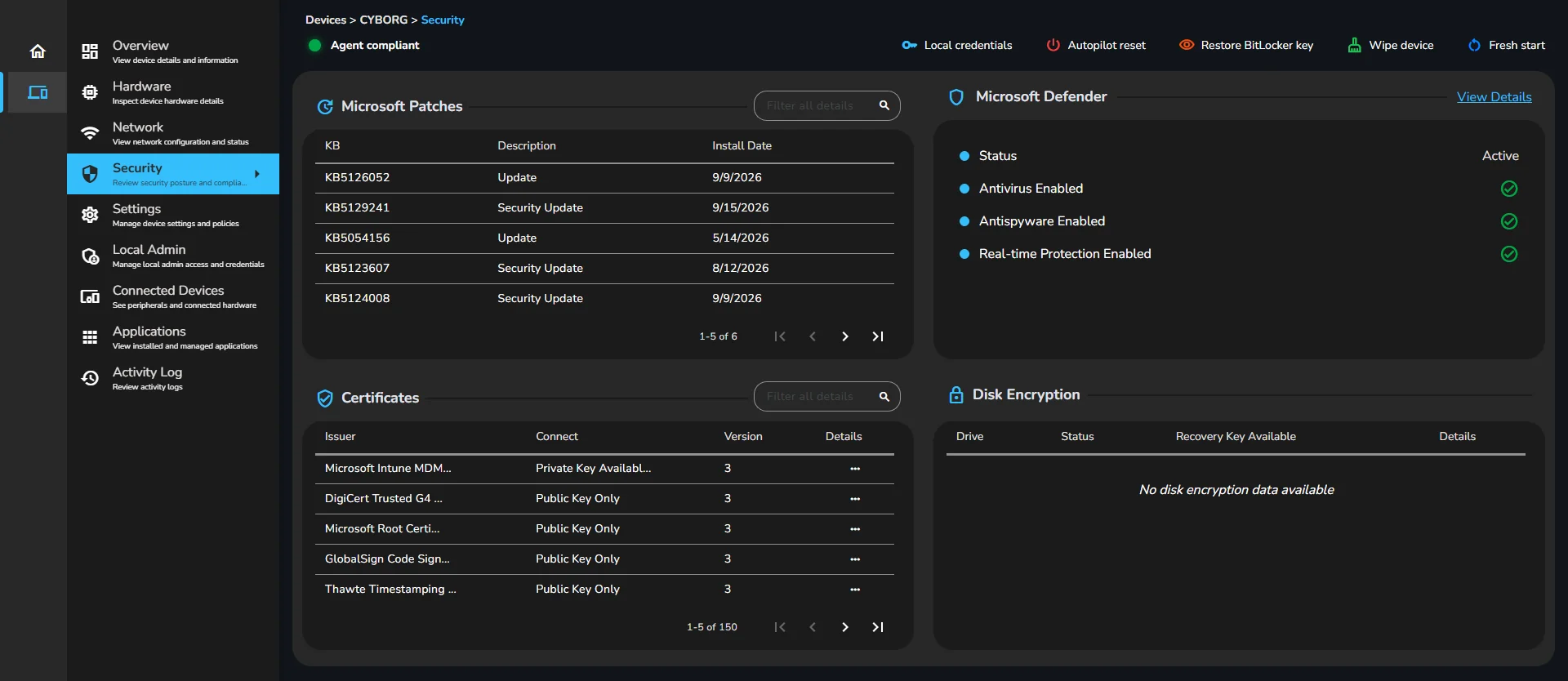
Local administrator accounts and groups Installed programs, services, scheduled tasks and startup entries Hardware, Defender, BitLocker, certificates and patches
Part of Avyna Core
Most of this comes from one Windows service.
The device page, the local administrators, the installed software, the security posture — the agent reports all of it. It deploys through Intune like any other application, connects outbound only, and needs no inventory server.
See what the agent reports- Hardware
- Security
- Applications
- Network
- Storage
- System
In practice
What it looks like on an ordinary Tuesday.
Security
The machine that isn’t what it claims to be
A device reports as compliant. Its page shows two local administrator accounts nobody recognizes and software installed outside your Intune deployments. Both are there because the machine reported them, not because someone went looking.
Helpdesk
A laptop goes missing on a Friday
A helpdesk agent gets the call, finds the device, and issues a wipe. They did not need to raise a ticket to someone with directory rights — and they could not have touched a device outside the group they look after even if they had tried.
Helpdesk
A recovery key at 8am
Someone’s machine boots to the BitLocker prompt. The person handling it retrieves the recovery key from the device page — a permission held by a handful of people, and only for the devices in their scope — instead of hunting for a directory administrator.
IT lead
The admin account nobody provisioned
A check of the estate turns up a machine whose local Administrators group contains an account matching no naming convention and no ticket. Intune’s policy report said the local-group policy applied successfully — which it did. The account was added before the policy existed, and the agent is what shows it.
IT lead
“What model is that, and does it have enough memory?”
A refresh planning exercise stops being a spreadsheet exercise. Processor, RAM, BIOS and model are already reported for every machine, along with battery health percentages and charge cycles.
Finance
Renewal season
Ahead of the Microsoft renewal, the licence assignment report shows subscriptions owned against assignments made, with SKU codes resolved to product names — so the conversation with the reseller starts from a list rather than a guess.
IT lead
A new site joins the group
A newly acquired office gets its own IT contact. Rather than a tenant-wide role, they get a role scoped to that site’s users and devices: they see their own estate, act on it, and nothing else appears in their lists.
Security
A certificate expires on a Sunday
A machine’s certificate list carries issuer and validity dates, so the one expiring next month is visible on the device page rather than discovered when something stops authenticating.
Stated plainly
What Core does not do.
You will find this out in a demo anyway. Here it is now, so nobody spends three weeks evaluating the wrong product.
Managing or inventorying non-Windows devices — the agent is Windows-only Estate-wide search or reporting over agent inventory — the data is presented per device today Alerting, monitoring, thresholds or change detection Real-time data — the agent reports on a cycle Remote control or remote scripting Automated remediation, policy enforcement or patch deployment Software packaging or distribution Ticketing Any mobile app
Roadmap · not shipped yet
Where Core is heading.
Deliberately light on detail. None of this is available today, and none of it is counted anywhere else on this page.
The local-admin question, asked across the estate
Everything needed is already collected and stored per device on every check-in. What is coming is the view that asks it of the whole fleet at once.
Reporting and search over what the agent collects
The collection, the storage and the history exist today. The cross-device views are being built on top of them.
Top questions
What people ask first
Does this replace Intune?
No. Intune stays your device management and deployment system, and Entra stays your directory. Avyna Core reads from them, acts through them, and adds what they do not hold.
Do we have to deploy the agent?
The agent is what supplies the device inventory — hardware detail, security configuration, installed software, local administrators, network, storage and peripherals. Without it those pages have little to show, and you are left with the Microsoft record.
Does it need a connection into our devices?
No. The agent connects out to the platform; nothing connects in. If the service cannot be reached it retries with backoff and keeps the report locally until it can send.
How do we grant access, and what access does it need?
Through Microsoft’s admin consent page. A Global Administrator reviews the requested permissions on Microsoft’s screen and approves them there. There is no form on our site, no password to give us, and no service account to create. Consent is recorded and the connection is only live once Microsoft confirms it.
How is it priced?
Two licences, both monthly. A user licence for each person using the product, priced by the plan you are on — the plan also decides which capabilities are switched on. And a device licence for each machine running the agent, priced the same on every plan. You buy the quantity you need and assign them. You choose monthly billing or a twelve-month commitment.
In pilot
Ask about the pilot.
Intune tells you a device is enrolled, encrypted and compliant. It does not tell you which local administrator accounts exist on it, what software was installed outside your Intune deployments, or how the machine is really configured. And it does not let a first-line helpdesk agent reset a password or wipe a lost laptop without rights over your whole tenant. Core answers both.